
|
|
3.5 CHOOSING EXPOSURE MODES | ||
 Learn
To Draw Learn
To Draw |
Learn
To Paint |
Photoshop
Elements |
Animation
Menu |
Art
Principles |
Art
Appreciation |
Many cameras offer more than one exposure mode. In fully automatic mode the camera sets the shutter speed and aperture to produce the best possible exposure. However, there are two other automatic exposure modes that are widely used in photography—aperture-priority and shutter-priority. All modes give equally good results in the vast majority of photographic situations. However, when you photograph in specific kinds of situations, these alternate exposure modes may have certain advantages.
Let’s take a look at each of the available modes.
- Fully Automatic, or program mode, sets the shutter speed and aperture, white balance, and focus without your intervention. This mode allows you to shoot without paying attention to settings so you can concentrate on composition and focus.
- Aperture priority (or aperture preferred) mode lets you select the aperture (lens opening) needed to obtain the depth of field you want and the exposure system automatically sets the shutter speed to give you a good exposure. You select this mode whenever depth of field is most important. To be sure everything is sharp, as in a landscape, select a small aperture. The same holds true for close-up photography where depth of field is a major concern. To throw the background out of focus so it’s less distracting in a portrait, select a large aperture.
- Shutter priority (or shutter priority) mode lets you choose the shutter speed you need to freeze or deliberately blur camera or subject movement and the camera automatically sets the aperture to give you a good exposure. You select this mode when the portrayal of motion is most important. For example, when photographing action scenes, such as those encountered by wildlife photographers, sports photographers, and photojournalists, shutter-priority mode might be best. It lets you be sure your shutter speed is fast enough to freeze the action or slow enough to blur it
- Manual mode lets you select both the shutter speed and the aperture.
One of the things that makes photography so enjoyable is the chance you get to interpret a scene in your own way. Shutter speeds and aperture controls are two of the most important ways you have of making a picture uniquely your own. As you become more familiar with their effects on a picture, you will find yourself making choices about them more instinctively: knowing, for example, that you want only the main subject sharp and so turning to a larger aperture.
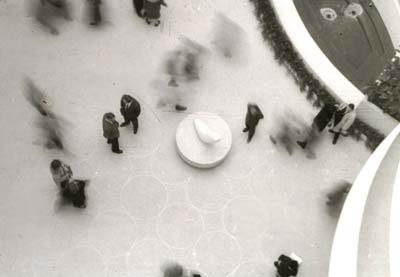 |
Shooting down from an upper level at the Guggenheim Museum froze the two people talking, but blurred everyone walking by. |
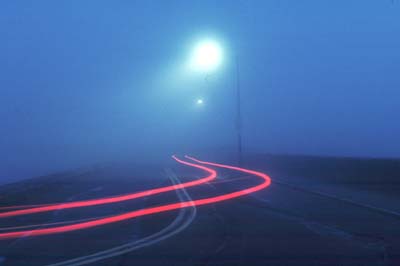 |
Leaving the shutter open for an extended period of time, leaves light trails in the image created by the taillights of a passing car. |
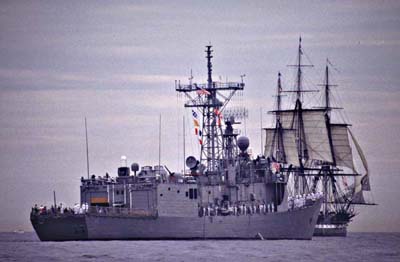 |
Photographing the U. S. Constitution from the deck of a moving speedboat with a long lens took a fast shutter speed. |
| How To: Changing Exposure Modes
Look in your camera manual for sections on aperture preferred mode, shutter preferred mode, automatic or program mode, shutter speeds, and apertures: ___________________________________________________________________________________________ |