Internet Studies
Instructor: Mr. Dunfee
Telnet Exercises
Use the directions in these exercises
to complete the questions in your Portfolio Presentation.
- Exercise #1
- The Internet Network Information Center
- Click here for more
info
- Link to start session: telnet://is.internic.net/
- Connect to this Telnet host in the
following manner.
- Start the Telnet session by clicking on the "start session"
link above.
- Type: whois newport news
- Find the Domain Name for Newport News Public Schools (hint:
it's on the same line as "Newport News
Public Schools (NNPS-DOM)")
- Type your answer into the chart for Exercise #1 in your
Portfolio Presentation Document.
- You will now continue to see the "Whois:
" prompt. So you will not have to type "whois" any
more--just the name of the item you want to search for.
- Continue searching for Domain Names by typing the "Whois:"
Search Item as written in your Exercise #1 chart.
- If you can't find any of the items
listed, try typing in just the first word or two and
then looking down the list it gives you.
- You may need to type slowly, pausing
between keys, because sometimes telnet service can be
very slow responding.
- TO LOGOFF
- type "exit" twice, pressing
the Enter key after each.
- You will see:
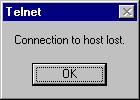
- Click OK and close the Telnet window.
- Using Netscape...
- Go to the Domain Name for each of the items found above.
- NOTE: You may have to add "www."
in front of the Domain Name provided. For example, instead
of aabbcc.com, you would type www.aabbcc.com.
- Answer each of the questions on the Exercise #1 chart,
using information found on the web page for each Domain
Name.
- Exercise #2
- The New York Public Library's card catalog
system
- Click here for more
info
- Link to start session: telnet://nyplgate.nypl.org/
- Connect to this Telnet host in the
following manner.
- Start the Telnet session by clicking on the link above.
- At the "login:" prompt, type "nypl".
- Select "1 - NYPL Branch Libraries Catalog" and wait while
the screen scrolls a while.
- When the scrolling stops and you see the big black box
that says "Library Entrance Online", press Enter. (The directions
on the screen say "press Return". This is the same thing).
- Complete the question on your Portfolio Document about
the Dial In Access menu.
- In the NYPL Dial In Access menu, select "2. Periodical
and Newspaper Indexes".
- When asked for your "barcode number", enter "123".
- Select "4. Newspaper Indexes".
- Select "1. Keywords".
- Enter the keywords "national parks", to search for a magazine
or newspaper articles.
- WAIT until the search list appears, then scroll down several
pages until you find an article that interests you.
- Select ANY FIVE to complete the chart in your Portfolio
Presentation Document.
- TO LOGOFF
- Press "q", then Enter until you see "5. Logoff"
- This only takes you back to NYPLnet.
- This press "3" to exit NYPLnet.
- You will see:
- Click OK and then close the Telnet window.
- Exercise #3
- St. Joseph County Public Library List of
Public Libraries with Telnet Services
- Click here for more
info.
- Click
here to go to the web site.
- At the web site, NOTICE THE URL'S AT THE BOTTOM OF THE PAGE as
you pass the cursor over the library names on the list.
- Some begin with "telnet://"
- Some begin with "http://"
- Some begin with "gopher://"
- Choose ANY THREE libraries whose URL starts with "telnet://" and
complete the information in the Portfolio Presentation Document.
- BE SURE TO LOGOFF following the directions provided
to you on the Telnet screen. Always look for the "Connection to host
lost" box to be sure that you logged off correctly.
Back to This Lesson
Back to List of All Lessons